
Understanding Virtualization Timing, Delayed BindingContext Assignment, and Layout Rehydration in .NET MAUI**
A common visual glitch in .NET MAUI CollectionView is when an item briefly:
- Appears blank
- Shows no text or image
- Displays only the background
- Shows previous item content before updating
- Flickers while scrolling quickly
This issue is most noticeable on Android, but it also occurs on iOS under heavy load.
Developers often assume the DataTemplate is broken or the binding failed —
but the real cause is MAUI’s virtualization pipeline and delayed BindingContext rehydration.
This article explains why items temporarily appear empty and how to eliminate the flicker entirely.
Summary Card, TLDR
Why Items Momentarily Disappear in .NET MAUI CollectionView
1. Virtualization reuses cells faster than bindings can update
CollectionView recycles a small pool of item containers.
When you scroll fast, a recycled cell appears on screen before its new BindingContext and bindings have fully applied, so it looks empty for a frame.
2. Heavy DataTemplates slow down rehydration
Deep layout trees, many bindings, converters, and complex visuals increase measure and arrange time, widening the gap where the cell is visible but not yet populated.
3. Asynchronous image loading creates blank patches
Images bound from URLs or large resources load on a background thread.
Until decoding and layout finish, the cell can look like a blank rectangle even though the BindingContext is set.
4. Dynamic row height introduces extra layout passes
When item height depends on content, fast scrolls force repeat measure and arrange cycles while BindingContext is changing, which makes empty or half drawn rows more frequent.
5. Device performance directly affects flicker severity
Lower end Android devices, GC pauses, and GPU stalls make the timing gap between “cell visible” and “data bound and drawn” much more noticeable.
How to Reduce or Eliminate Flicker
- Simplify row templates, reduce nesting, and avoid heavy converters.
- Prefer fixed row heights when possible instead of fully dynamic layouts.
- Cache images and preload or warm up data before the cell enters view.
- Use placeholder or skeleton UI instead of showing a truly empty cell.
Core Principle
Virtualization is not the bug.
Flicker happens when recycled containers become visible before data and visuals are fully ready.
Optimize templates and data flow so a recycled cell can draw meaningful content on the very first frame.
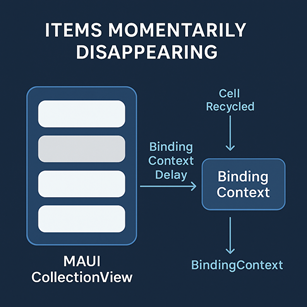
1. The Core Issue: Virtualization Reuses UI Containers Faster Than Data Binding Can Update
CollectionView doesn’t create a visual container for every item.
Instead, it recycles a small pool of templates during scroll.
When fast scrolling occurs:
- A recycled cell is brought into view
- MAUI resets its BindingContext
- The UI thread schedules a layout pass
- BindingContext update triggers property bindings
- The actual content is displayed
Between steps 1 and 5, there may be a 1–30ms gap in which:
- The UI has no valid BindingContext
- The cell displays default/empty visual state
This results in the “blank item” effect.
2. Heavy DataTemplates Increase the Blank-Frame Window
Complex templates delay binding application:
- Nested Grids/Layouts
- Large images
- Multiple converters
- Expensive OnPropertyChanged handlers
- Long measure/arrange passes
The heavier the template, the longer the cell stays empty before content appears.
This is why fluttering is more common in:
- Chat/message list UIs
- Image-heavy rows
- Deep layout hierarchies
- Lists with dynamic height
3. Items Flicker When BindingContext Is Assigned Late
When recycling a template, MAUI does:
But this happens asynchronously relative to:
- UI rendering
- PropertyChanged propagation
- VisualStateManager transitions
- Image loading
If rendering occurs before these finish:
The item appears blank for 1 frame
because the BindingContext is valid but the UI hasn’t updated yet.
4. Asynchronous Images Cause Blank Areas
If your template includes:
Then image loading happens off-thread, and rendering happens once the bitmap is decoded.
Until then:
- The Image control displays nothing
- The layout may reserve space
- The recycled cell appears empty for several frames
This problem is amplified when:
- Images are remote URLs
- Using HttpClient without caching
- Large images must be downscaled
- Device is low-performance
5. Items Reset When Height Is Dynamic
If item height depends on content:
then fast scroll → measure pass → arrange pass → BindingContext update
creates timing gaps that show as “empty rows.”
Dynamic height + virtualization = inevitable temporary visual gaps.
6. The Most Reliable Fix: Preload or Prebind Before the Cell Enters View
You can override the default behavior by using ItemAppearing or a custom preload strategy.
Example:
{
var item = (MyItem)e.Item;
item.Preload();
}
Preloading ensures:
- Image is loaded
- Data is prepared
- BindingContext is warm
before the container is displayed.
7. Simplify the Template to Reduce Blank Frames
Best practices:
✔ Reduce layout nesting
Prefer:
- Grids over StackLayouts
- Simple shapes
- Fixed-size images
✔ Cache image results
Use FFImageLoading, GlideX, or a memory cache layer.
✔ Avoid expensive converters
Precompute properties in the ViewModel instead.
✔ Use fixed row height when possible
Dynamic height introduces binding delays.
8. Use “Placeholder UI” Instead of Showing a Blank Cell
A modern strategy is to add a temporary skeleton UI:
<Label Text="{Binding Title}" IsVisible="{Binding IsPlaceholder, Converter={StaticResource Inverse}}" />
Benefits:
- No visual flicker
- Smoother perceived scrolling
- Predictable rendering path
9. Device Performance Affects Flicker Severity
Low-end or mid-range Android devices show the blank-frame problem more often because:
- They perform slower layout passes
- Garbage collection pauses occur mid-scroll
- The GPU pipeline stalls when images load
- Binding operations take longer
MAUI’s virtualization is highly dependent on device speed.
Final Expert Takeaway
Blank or flickering items during fast scroll are not a defect in your template —
they are an inherent artifact of:
- Virtualized container reuse
- Delayed BindingContext updates
- Asynchronous image loading
- Dynamic row measurement
- UI thread load during rapid gestures
To eliminate flicker:
✔ Preload data before display
✔ Simplify templates
✔ Use fixed heights
✔ Cache images
✔ Add placeholder UI
✔ Reduce BindingContext churn
The goal is not eliminating virtualization —
but making sure recycled cells can populate instantly when they appear.