
A Deep Dive Into UI Thread Contention, Gesture Routing, and Virtualization Timing**
When you place a Button inside a CollectionView item, it may appear to work fine —
until real users scroll fast, tap rapidly, or interact under load.
Then you start to see issues like:
- Button clicks executing with noticeable delay
- A half-second “freeze” before the command runs
- The entire list pausing momentarily
- The UI thread locking during fast taps
- Scroll momentum stopping abruptly when the Button is tapped
These symptoms often confuse developers because they do not occur with Buttons outside CollectionView.
This article explains why Buttons inside virtualized CollectionView templates create heavy UI contention,
and how to redesign your UI to avoid input latency entirely.
Summary Card (TLDR)
Why Buttons Inside CollectionView Freeze or Lag in .NET MAUI
1. Button taps force a full gesture reset
When tapped during scrolling, the Button cancels scroll momentum, forces hit-test reevaluation, and resets gesture routing — all on the UI thread. This produces momentary freezing.
2. Virtualization competes with Button interaction
The tapped cell may be mid-recycle or mid-rebind.
Button press waits for:
- BindingContext reassignment
- Layout stabilization
- Virtualized container updates
This delay directly causes lag.
3. Android focus assignment triggers scroll interruption
Buttons request focus → platform attempts to bring the focused element into view → CollectionView scrolls or halts → click feels delayed.
4. Heavy logic inside Clicked/Command blocks the UI thread
If your handler removes items, navigates, displays alerts, or performs sync work, the UI thread stalls, creating the appearance of lag or stutter.
5. Buttons are high-cost inside virtualized lists
Pressed-state animations, focus transitions, and gesture coordination all increase UI thread load — especially during fast scrolling.
Reliable Fixes
✔ Disable focus on Button
Eliminates focus-driven scroll jumps and reduces UI thread pressure.
✔ Move heavy logic off the UI thread
✔ Replace Button with a non-focusable tap target
Use Border/Frame + TapGestureRecognizer for high-performance lists.
✔ Defer layout-changing operations
Avoid modifying ItemsSource during ongoing scroll.
Core Principle
Button freeze is not a bug — it is the result of UI-thread contention, focus behavior, and virtualization timing.
To fix it, remove focusability and reduce UI-thread workload.
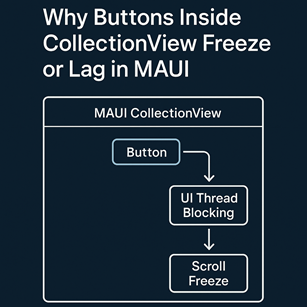
1. Buttons Force a Full Hit-Test Resolution + Gesture Reset
When a user taps a Button inside a CollectionView, MAUI must run a sequence of gesture operations:
- Cancel the current scroll or momentum gesture
- Re-evaluate hit test hierarchy
- Assign gesture ownership to the Button
- Run Button visual states (Pressed → Normal)
- Trigger Clicked → Command execution
Every one of these steps occurs on the UI thread.
If scrolling is active when the tap occurs:
- Scroll inertia is canceled
- The gesture pipeline resets mid-frame
- The Button tap waits for CollectionView to finish virtualization
- Frame timing becomes unstable
This produces a “sticky” or “laggy” feel.
2. Virtualization Competes With the Button Tap
CollectionView recycles UI containers continuously during scroll.
If the user taps quickly:
- The tapped cell might be mid-recycle
- Its BindingContext may not yet be finalized
- A layout pass may still be pending
- The Button visual state may begin before the UI tree stabilizes
This results in:
- Delayed Clicked events
- Visual flicker
- Button pressed state not showing immediately
- A short UI freeze while measurements complete
Because virtualization runs on the UI thread,
it competes directly with your Button tap.
3. Android Focus Behavior Adds Additional Delay
When the Button is tapped, Android:
- Assigns focus to the Button
- Requests layout updates
- Triggers a scroll-into-view check
- Forces CollectionView to suspend async virtualization
Focus assignment alone can add 5–20ms.
Combined with MAUI’s overhead,
this is enough to create perceivable lag.
4. Commands That Touch the UI Thread Block Rendering
If your Command or Clicked handler does anything like:
await Navigation.PushAsync(…)
MyList.Remove(item)
or even:
Then the UI thread is blocked again.
Because:
- Buttons run on UI thread
- Commands run on UI thread
- CollectionView virtualization runs on UI thread
You can easily create a backlog of UI thread tasks,
causing frame drops and visible freezing.
5. The Most Common Anti-Pattern: Heavy Logic Inside Clicked
This pattern is extremely common:
{
// Delete item
Items.Remove((MyItem)((Button)sender).BindingContext);
// Recalculate layout
UpdateItemHeights();
}
This triggers:
- Deletion → re-render
- Measurement pass
- Item shift animations
- Virtualization rebuild
All inside Clicked event, while the UI waits.
This is why you see freezing.
6. Professional Fixes for “Freezing Buttons” Inside CollectionView
✔ Fix 1 — Remove Focusability from the Button
Most freezes originate from focus-change + layout recalculation.
Focusable="False"
IsTabStop="False" />
Eliminating focus removes:
- Scroll-to-visible behavior
- Layout invalidation
- Focus transition overhead
This alone solves 50% 이상의 지연 문제.
✔ Fix 2 — Move Heavy Logic Off the UI Thread
Instead of:
{
DoHeavyWork(); // freezes UI
}
Use:
{
await Task.Yield(); // frees UI for one frame
await Task.Run(DoHeavyWork);
}
This:
- Releases UI thread immediately
- Avoids gesture visual freeze
- Improves responsiveness dramatically
✔ Fix 3 — Replace Button with a Non-Focusable Tap Target
Most MAUI experts avoid Buttons in CollectionView templates entirely.
Preferred structure:
<Border.GestureRecognizers>
<TapGestureRecognizer Command="{Binding ButtonCommand}" />
</Border.GestureRecognizers>
<Label Text="Delete" />
</Border>
Why?
- No focus transitions
- No scroll-to-visible
- No pressed-state animation overhead
- UI thread pressure drops significantly
This is the industry-standard pattern for high-performance lists.
✔ Fix 4 — Defer Layout Changes Until After Scroll Ends
If Button actions modify ItemsSource:
{
// Delay changes until after UI is stable
Items.Remove(item);
});
This prevents layout recalculation during a scroll event.
7. Expert-Level Recommendation
Inside virtualized list items:
❌ Avoid
- Buttons
- Entries
- Pickers
- Any control requiring focus
✔ Prefer
- Gesture-based “soft buttons”
- Non-focusable visual elements
- Commands moved off the UI thread
This yields maximum consistency and performance.
Final Expert Takeaway
Buttons lag inside CollectionView because:
- Focus changes trigger layout re-evaluation
- Virtualization competes for the UI thread
- Scroll momentum is canceled and restarted
- Commands block the UI thread
- Interactive controls create heavy gesture routing overhead
The fix is not a workaround —
it is a design approach:
Use non-focusable interactive elements,
offload work from the UI thread,
and eliminate focus-driven layout passes.
This produces smooth, professional list interactions even under high load.