
and the Engineering Strategies to Fix Them**
CollectionView’s performance depends heavily on Item Recycling—the ability to reuse existing visual containers rather than recreating them while scrolling. In real-world MAUI applications, however, recycling is frequently disabled unintentionally due to subtle UI patterns, layout mistakes, or binding misconfigurations.
Once recycling breaks:
- The framework begins allocating new views for every item
- Memory consumption spikes
- Frame time jumps dramatically
- Smooth scrolling collapses into hitching and stutter
This article outlines the seven most common patterns that disable recycling in MAUI CollectionView and provides engineered, field-tested strategies to preserve virtualization and maintain smooth, performant scrolling.
Summary Card, TLDR
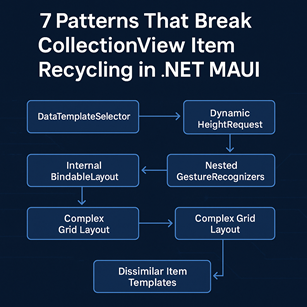
7 Patterns That Break CollectionView Item Recycling in .NET MAUI
1. DataTemplateSelector disables template caching
Per-item templates cannot be cached, forcing MAUI to create new cells instead of reusing existing ones.
2. Dynamic HeightRequest breaks virtualization
If a cell’s height changes mid-scroll, MAUI invalidates recycling and rebuilds the container.
3. Multiple or nested GestureRecognizers prevent reuse
Gesture trees create per-instance event state, making views non-recyclable.
4. BindableLayout inside ItemTemplate disrupts reuse
Nested lists trigger unpredictable layout recalculations, defeating virtualization.
5. ControlTemplate that swaps controls at runtime breaks structural consistency
Recycling requires identical UI structure — dynamic control replacement prevents reuse.
6. Overly complex Grid/StackLayout hierarchies increase measurement cost
If measuring a recycled cell is slower than creating a new one, MAUI discards recycling.
7. Templates that differ significantly between items disable recycling
Dissimilar UI structures force MAUI to treat each cell as unique.
Optimization Strategies
✔ 1. Use explicit template caching
✔ 2. Set ItemSizingStrategy="MeasureFirstItem"
Prevents remeasuring every item.
✔ 3. Prefer fixed row heights
Stable geometry → reliable recycling.
✔ 4. Optimize image loading
Downsampling + caching + minimal animations.
✔ 5. Use ViewModel Commands instead of code-behind event handlers
Preserves stateless templates.
✔ 6. Remove BindableLayout inside templates
Use nested CollectionView or simpler layouts.
Final Principle
CollectionView recycling only works when templates are structurally identical, lightweight, and predictable.
Once consistency is broken, MAUI discards recycling and performance collapses.
1. DataTemplateSelector Prevents Template Caching
A DataTemplateSelector returns a different template instance per item, which means MAUI cannot cache or reuse containers. The framework must recreate a full visual tree every time a recycled slot needs content.
Why This Breaks Recycling
Template selectors imply “per-item template uniqueness.”
Recycling relies on “template uniformity.”
These two concepts fundamentally conflict.
Expert Strategy
- Avoid per-item template variation unless absolutely necessary
- Prefer a single template with internal conditional UI states
- If selector is required, ensure each template is extremely lightweight
2. Dynamically Changing HeightRequest Inside the Template
Recycling depends on predictable geometry.
If a cell changes height mid-scroll, MAUI invalidates the container, forcing a full reconstruction.
Why This Breaks Recycling
Layout recalculation + height invalidation = container disposal.
Expert Strategy
- Use fixed heights whenever possible
- For expandable/collapsible UI, animate internal content, not the outer container
- Maintain consistent outer HeightRequest to protect reuse
3. Excessive or Nested GestureRecognizers
Attaching multiple TapGestureRecognizer or SwipeGestureRecognizer instances adds additional event routing layers and prevents MAUI from safely reusing the container.
Why This Breaks Recycling
Each GestureRecognizer is a bindable object linked to the cell lifecycle.
Recycling requires stateless views, but gesture graphs create state.
Expert Strategy
- Limit GestureRecognizers to one per cell
- Prefer Buttons or Command-based interactions over heavy gesture trees
- Consolidate gestures onto a single tap target when possible
4. Using BindableLayout Inside the ItemTemplate
A BindableLayout inside a CollectionView cell produces a “nested virtualization” scenario.
Inner collections invalidate layout on every content change, forcing MAUI to discard cached containers.
Why This Breaks Recycling
Nested BindableLayout = unpredictable children count = layout invalidation = no reuse.
Expert Strategy
- Remove BindableLayout from ListItems
- Replace with:
- A nested CollectionView
- A simplified vertical layout
- Static UI skeleton with changed visibility
5. ControlTemplate That Changes Internal Controls Dynamically
Swapping controls or replacing content inside a ControlTemplate prevents MAUI from reusing the visual tree.
Why This Breaks Recycling
MAUI caches ControlTemplates only if the structure stays identical.
Dynamic control replacement appears as a “template mismatch.”
Expert Strategy
- Avoid runtime control replacement
- Use VisualStateManager to change visibility or styling instead
- Keep structural UI identical across items
6. Overly Complex Grid/StackLayout Structures
Deeply nested layouts, excessive RowDefinition/ColumnDefinition usage, or complex measurement logic can cause layout thrash. MAUI may choose not to reuse a cell if measuring and arranging the recycled layout becomes more expensive than generating a new one.
Why This Breaks Recycling
Recycling is profitable only when layout is inexpensive.
Heavy templates defeat the purpose.
Expert Strategy
- Prefer a single Grid + optional VerticalStackLayout
- Remove unnecessary nesting and margins
- Use consistent cell shapes across all items
This alone can improve scroll FPS by 20–40 percent.
7. Item Templates That Differ Significantly Between Items
If different items produce drastically different UI trees (e.g., one item has an image, another has three buttons), MAUI invalidates recycling to avoid structural mismatch.
Why This Breaks Recycling
Recycling requires structural sameness.
Structural variability forces reconstruction instead.
Expert Strategy
- Keep template structure identical for all items
- Use IsVisible to toggle optional visual elements
- Never change the shape of the template based on data
Engineering Strategies to Guarantee Recycling
1. Apply Template Caching Explicitly
You can force caching by predefining the DataTemplate:
collectionView.ItemTemplate = CachedTemplate;
This ensures MAUI reuses containers aggressively.
2. Use the Correct ItemSizingStrategy
Recommended:
This minimizes repeated measurement cost and aligns all items to the first measured height.
Avoid:
- MeasureAllItems — extremely expensive for large lists
- Dynamic heights that vary unpredictably
3. Prefer Fixed RowHeight Over Auto-Sizing
Fixed heights:
- Increase scroll predictability
- Reduce layout complexity
- Improve recycling consistency
Example:
4. Optimize Image Loading
Images are the single largest cause of recycling breaks and scroll jank.
Strategies
- Downsample to view size
- Use aggressive caching
- Disable heavy animations
5. Move Event Handlers to ViewModel Commands
Code-behind event subscriptions produce per-instance closures that hinder reuse.
Use:
instead of:
Command binding preserves stateless templates.
Debugging: How to Confirm Whether Recycling Is Working
Add a constructor log to your cell template:
{
InitializeComponent();
Debug.WriteLine("Cell Created");
}
If logs appear continuously while scrolling:
- Recycling is broken
- MAUI is allocating new containers instead of reusing existing ones
Healthy recycling should produce only a small number of logs at the start.
Final Project Checklist
To preserve recycling and maintain high scroll performance:
- Avoid TemplateSelector unless optimized
- Simplify templates and reduce nesting
- Minimize GestureRecognizers
- Fix cell height rather than letting it vary dynamically
- Remove BindableLayout from templates
- Optimize image loading behavior
- Avoid changing UI structure during scrolling
- Utilize explicit DataTemplate caching
Applied together, these practices consistently improve CollectionView performance by 30 percent or more, especially in data-heavy mobile scenarios.
In MAUI, CollectionView recycling is not a luxury—it's the foundation of performant list rendering.
Protect it intentionally, or you will pay the price in memory, CPU, and user experience.